跳转到主要内容

网页转 Markdown API

网页转 Markdown API,提取可读的文章正文。

获取文本流程所需的文章内容。渲染页面、请求 Markdown,并为后续处理保留来源。

01 / 产品介绍

什么是网页转 Markdown API?

AdsCrawl 网页转 Markdown API 使用 POST /html,将 contentMode 设置为 markdown,把页面 URL 转为可读的文章内容。浏览器先渲染页面,再提取主要正文。返回的 Markdown 适合研究、文档处理和大模型流程,面向文章文本而非完整页面标记。

问题直答

文章提取 API 能处理现代 Web 应用吗?

可以,前提是渲染后的页面包含可读的文章正文。AdsCrawl 的 POST /html 设置 contentMode 为 markdown 后,会渲染页面并提取正文。它不是交互应用的完整导出:仪表盘、表格或需要额外操作才出现的内容,可能更适合命名字段提取或 CDP 工作流。

  1. 先为一篇代表性文章请求 Markdown,把返回文本与渲染后的页面对照。
  2. 检查必要段落和标题,不要假设导航、组件和每张表格都被保留。
  3. 保存来源 URL 和抓取时间,再进行分块、索引或摘要处理。

实际效果

真实网页,返回可读 Markdown。

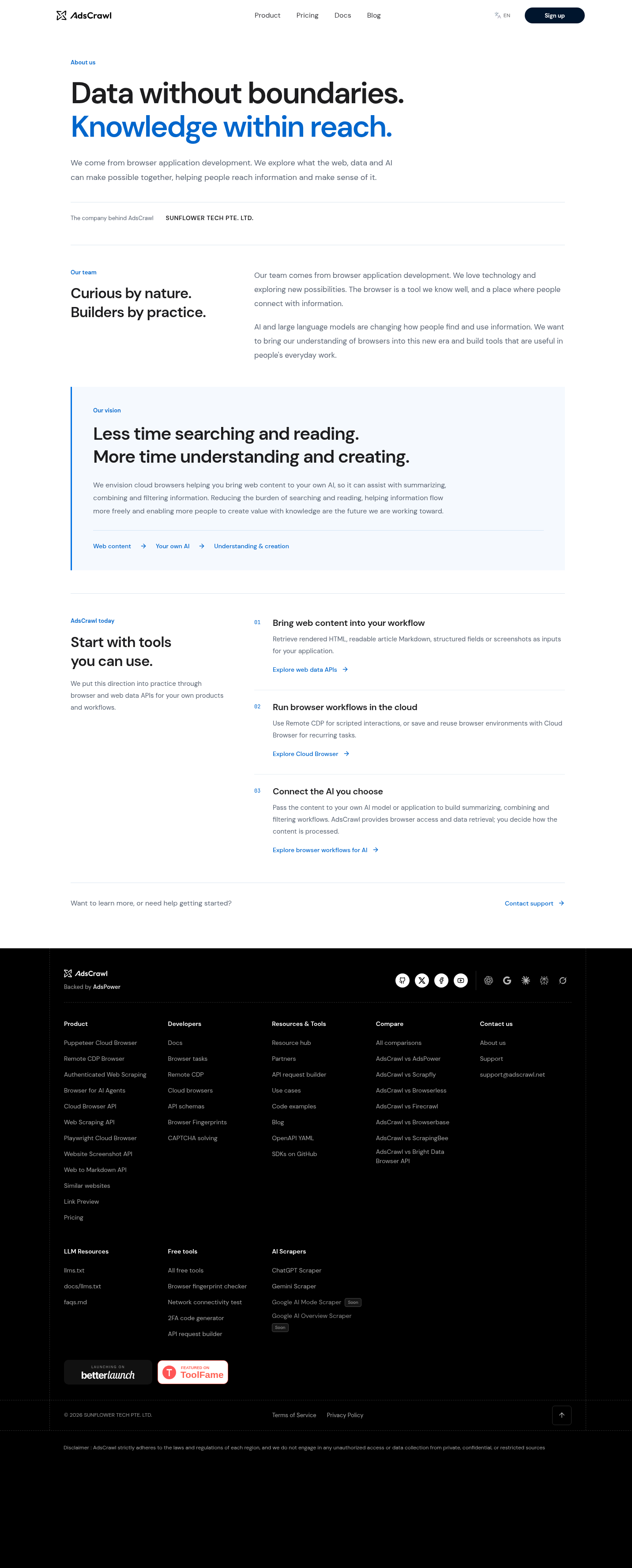
这次请求提取了 AdsCrawl About 页的主要内容。接入文本处理流程前,可直接检查保存响应中的标题、段落与链接。

实际采集于

输出格式
Markdown
字节
2,241
HTTP
200
源页面截图访问源页面
通过截图 API 采集的 AdsCrawl About 页面,用于对照其提取出的 Markdown
向下滚动查看完整截图原始 PNG
Markdown
# About us | AdsCrawl

About us

## Data without boundaries.  
Knowledge within reach.

We come from browser application development. We explore what the web, data and AI can make possible together, helping people reach information and make sense of it.

The company behind AdsCrawl**SUNFLOWER TECH PTE. LTD.**

Our team

## Curious by nature. Builders by practice.

Our team comes from browser application development. We love technology and exploring new possibilities. The browser is a tool we know well, and a place where people connect with information.

AI and large language models are changing how people find and use information. We want to bring our understanding of browsers into this new era and build tools that are useful in people's everyday work.

Our vision

## Less time searching and reading. More time understanding and creating.

We envision cloud browsers helping you bring web content to your own AI, so it can assist with summarizing, combining and filtering information. Reducing the burden of searching and reading, helping information flow more freely and enabling more people to create value with knowledge are the future we are working toward.

1.  Web content
2.  Your own AI
3.  Understanding & creation

AdsCrawl today

## Start with tools you can use.

We put this direction into practice through browser and web data APIs for your own products and workflows.

1.  ### Bring web content into your workflow
    
    Retrieve rendered HTML, readable article Markdown, structured fields or screenshots as inputs for your application.
    
    [Explore web data APIs](https://www.adscrawl.net/web-scraping-api/)
    
2.  ### Run browser workflows in the cloud
    
    Use Remote CDP for scripted interactions, or save and reuse browser environments with Cloud Browser for recurring tasks.
    
    [Explore Cloud Browser](https://www.adscrawl.net/cloud-browser-api/)
    
3.  ### Connect the AI you choose
    
    Pass the content to your own AI model or application to build summarizing, combining and filtering workflows. AdsCrawl provides browser access and data retrieval; you decide how the content is processed.
    
    [Explore browser workflows for AI](https://www.adscrawl.net/browser-for-ai-agents/)

如何核对这次结果

对照源页面检查主要章节与链接。请求指定 main,外围导航和页脚不在提取范围内。

用自己的页面试试 →

单次公开页面演示,结果反映采集时的页面状态;目标网站、加载条件和请求设置会影响后续结果。

02 / 适用场景

适合哪些任务?

01

准备检索文本

将可读正文输入自己的分块与检索流程,同时保存来源 URL,让后续答案能够引用原页面。

02

收集研究材料

以便于处理的文本格式保存文章内容,用于内部参考;在生成摘要或报告前检查结果。

03

选择合适的表示

正文选择 Markdown,渲染标记选择 HTML,精确值选择命名字段提取,减少不必要的格式解析。

03 / 快速开始

从一个完整流程开始

  1. 创建服务端 API Key,并选择页面 URL。
  2. 调用 POST /html,将 contentMode 设置为 markdown。
  3. 检查响应状态,将文本保存为 page.md。
  4. 检查提取内容,并在后续流程中保留来源 URL。

示例环境:Bash 与 cURL。 先在服务端设置 ADSCRAWL_API_KEY 环境变量。

完整参数与响应说明 →
cURL
curl --fail-with-body -sS \
  -X POST "https://api.adscrawl.net/html" \
  -H "x-api-key: $ADSCRAWL_API_KEY" \
  -H "content-type: application/json" \
  -d '{
    "url": "https://www.adscrawl.net",
    "contentMode": "markdown",
    "waitUntil": "domcontentloaded"
  }' \
  --output page.md

工作流指南

为 RAG 流程准备网页正文

通过网页 URL 获取 Markdown 正文后,先检查内容,再补充来源信息并进行分块或索引。根据页面内容选择合适的提取模式。

将文章正文提取为 Markdown

调用 POST /html,将 contentMode 设置为 markdown。可通过 selector 将正文提取范围限定到第一个匹配元素。响应为 Markdown 文本,应用应按文本读取或保存。

查看 Markdown 提取参数

采集固定的一组字段

需要商品属性、价格等指定值时,使用网页采集 API 定义字段。正文提取会选择可读内容,导航、控件和周边页面元素可能不会保留。

选择结构化字段提取

示例输出(非实际请求结果)

以下为手工编写的 Markdown 格式示意,便于理解文本流程如何使用结果。实际内容与格式取决于源页面。

# 取件指南

领取包裹时,请携带订单编号。

## 营业时间

- 周一至周五
- 09:00 至 17:00

如何确认结果可用

  • 建立索引前,将返回文本与源文章对照,确认应用需要的主要段落已经保留。
  • 页面没有可提取正文时,处理 READABILITY_CONTENT_NOT_FOUND;根据页面结构选择 HTML 或指定字段提取。
  • 在应用中将来源 URL、抓取时间与 Markdown 一起保存,用于展示引用和后续更新文档。

04 / 限制与计费

接入前需要了解

注册获 500 一次性积分。Hobby、Starter 和 Pro 每月分别为 9、49 和 199 美元。启动持久云浏览器需要付费套餐。

比较套餐与额度 →
  • 正文提取不是网页的无损副本,导航、交互组件和依赖布局的元素可能被省略。
  • Markdown 转换不会验证原文事实,也不代表获得转载许可。
  • 动态内容仍依赖页面加载与受支持的等待设置,需检查输出是否包含所需部分。
  • 请求消耗额度并受账号限制,该接口不会直接提供完整的检索或向量化流程。

API Key 仅保存在服务端。遇到 HTTP 402 请检查额度,遇到 429 请降低并发并退避重试。

05 / FAQ

常见问题

需要调用独立的 /markdown 接口吗?

不需要,调用 POST /html 并设置 contentMode 为 markdown,通过现有接口的输出模式获得 Markdown。

Markdown 包含所有页面元素吗?

不包含。它面向可读内容,不会完整表示视觉布局或所有交互元素。

提取精确商品字段适合用它吗?

需要固定命名值时,应使用网页采集 API 并显式定义字段;需要可读文本时再选择 Markdown。